Get row number from a match

Excel has a function to locate a value on a range of cells and return the number of the row where the value is found, it’s the MATCH() function. The syntax is like this:

MATCH(lookup_value,lookup_array,match_type)

lookup_value is the value that we want to look for and lookup_array is the range of cells where we want to search. match_type can have 3 values:
1 - finds the largest value that is less than or equal to lookup_value. Lookup_array must be placed in ascending order;
0 - finds the first value that is exactly equal to lookup_value
-1 - finds the smallest value that is greater than or equal to lookup_value. Lookup_array must be placed in descending order.
If match_type is omitted, it will assume to be 1.
Here’s an example. We have the following table:
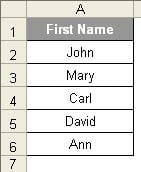

We want to find the name Mary on the range of A2:A6. So we should use this formula:

=MATCH("Mary",A2:A6,0)

This will return 2 because the name Mary can be found on cell A2.

4 comentários:

Andy said...

Great post! This is a very useful article. You should think about joining the Excel conversation on Facebook at http://www.facebook.com/office

Cheers,
Andy
MSFT Office Outreach Team

WingedOne said...

As a clarification, MATCH returns a relative reference in the look-up array, not as an absolute reference to the worksheet cell. In this example, MATCH does return a "2" because "Mary" is the second entry in the array, but not to the absolute location of "Mary", which is in cell A3.

To return an absolute row, the easiest way is to use the ROW function in conjunction with MATCH and reference the array:

=MATCH("Mary",A2:D6,0)+ROW(A2:D6)-1

Two items about the above formula:
-It compensates for arrays not starting out on A1.
-It uses the not-standard use of the ROW function by entering it as a regular (non-array) formula to return the upper row of the array.

Anonymous said...

Great post, and great addition, WingedOne. Thanks.

Anonymous said...

Great post. It return the first row in which the value appears. But how do I find muliple row numbers?

I want to search an entire column for the value "1", and want excel to return me all the row numbers in which this occurs.

Anyone help?